> ## Documentation Index
> Fetch the complete documentation index at: https://cometchat-22654f5b-docs-angular-v5-docs-update.mintlify.site/llms.txt
> Use this file to discover all available pages before exploring further.
# Real-Time Events
> Listen for incoming messages, presence changes, typing indicators, receipts, group events, and connection state.
The `UCometChatSubsystem` exposes 40+ multicast delegates organized by listener type. All delegates fire on the **Game Thread**, so you can safely update UI directly.
### Event Flow
```mermaid theme={null}
flowchart LR
A["CometChat Cloud"] -.->|"WebSocket"| B["C++ SDK"]
B --> C["Subsystem Delegate"]
C --> D["Your Blueprint / C++ handler"]
style A fill:#555,stroke:#999,color:#ccc
style B fill:#333,stroke:#666,color:#fff
style C fill:#444,stroke:#888,color:#fff
style D fill:#333,stroke:#666,color:#fff
```
**Bind delegates before calling Login.** Events that arrive between Login completing and your bindings being set up will be missed.
***
## Binding Delegates
1. Get a reference to the **CometChat Subsystem**
2. Drag off the Subsystem pin and search for the delegate name (e.g., **On Text Message Received**)
3. Select **Bind Event** to wire it to a custom event node
4. The custom event automatically gets the correct parameter type
```cpp theme={null}
void AMyActor::BeginPlay()
{
Super::BeginPlay();
UCometChatSubsystem* Chat = GetGameInstance()->GetSubsystem();
// Message events
Chat->OnTextMessageReceived.AddDynamic(this, &AMyActor::HandleTextMessage);
Chat->OnTypingStarted.AddDynamic(this, &AMyActor::HandleTypingStarted);
// User events
Chat->OnUserOnline.AddDynamic(this, &AMyActor::HandleUserOnline);
// Group events
Chat->OnGroupMemberJoined.AddDynamic(this, &AMyActor::HandleMemberJoined);
// Connection events
Chat->OnConnected.AddDynamic(this, &AMyActor::HandleConnected);
Chat->OnDisconnected.AddDynamic(this, &AMyActor::HandleDisconnected);
}
```
***
## MessageListener Events
These fire when messages, typing indicators, receipts, or reactions arrive.
| Delegate | Payload | Fires When |
| ------------------------------ | ------------------------------ | ------------------------------------------------ |
| `OnTextMessageReceived` | `FCometChatMessage` | A text message arrives |
| `OnMediaMessageReceived` | `FCometChatMessage` | A media (image/video/audio/file) message arrives |
| `OnCustomMessageReceived` | `FCometChatMessage` | A custom message arrives |
| `OnInteractiveMessageReceived` | `FCometChatMessage` | An interactive message arrives |
| `OnInteractionGoalCompleted` | `FCometChatInteractionReceipt` | An interaction goal is completed |
| `OnTypingStarted` | `FCometChatTypingIndicator` | A user starts typing |
| `OnTypingEnded` | `FCometChatTypingIndicator` | A user stops typing |
| `OnMessagesDelivered` | `FCometChatMessageReceipt` | Messages delivered to recipient |
| `OnMessagesRead` | `FCometChatMessageReceipt` | Messages read by recipient |
| `OnMessagesDeliveredToAll` | `FCometChatMessageReceipt` | Messages delivered to all group members |
| `OnMessagesReadByAll` | `FCometChatMessageReceipt` | Messages read by all group members |
| `OnMessageEdited` | `FCometChatMessage` | A message is edited |
| `OnMessageDeleted` | `FCometChatMessage` | A message is deleted |
| `OnTransientMessageReceived` | `FCometChatTransientMessage` | A transient (ephemeral) message arrives |
| `OnMessageReactionAdded` | `FCometChatReactionEvent` | A reaction is added to a message |
| `OnMessageReactionRemoved` | `FCometChatReactionEvent` | A reaction is removed from a message |
| `OnMessageModerated` | `FCometChatMessage` | A message moderation status changes |
| `OnAIAssistantMessageReceived` | `FCometChatMessage` | An AI assistant message arrives |
| `OnAIToolResultReceived` | `FCometChatMessage` | An AI tool result arrives |
| `OnAIToolArgumentsReceived` | `FCometChatMessage` | AI tool arguments arrive |
Bind to **On Text Message Received**. The custom event receives an `FCometChatMessage`. Use `ReceiverType` to check if it's a `user` (1:1) or `group` message.
```cpp theme={null}
void AMyActor::HandleTextMessage(const FCometChatMessage& Message)
{
if (Message.ReceiverType == TEXT("group"))
{
UE_LOG(LogTemp, Log, TEXT("[Group %s] %s: %s"),
*Message.ReceiverUid, *Message.SenderName, *Message.Text);
}
else
{
UE_LOG(LogTemp, Log, TEXT("[DM] %s: %s"),
*Message.SenderName, *Message.Text);
}
}
```
***
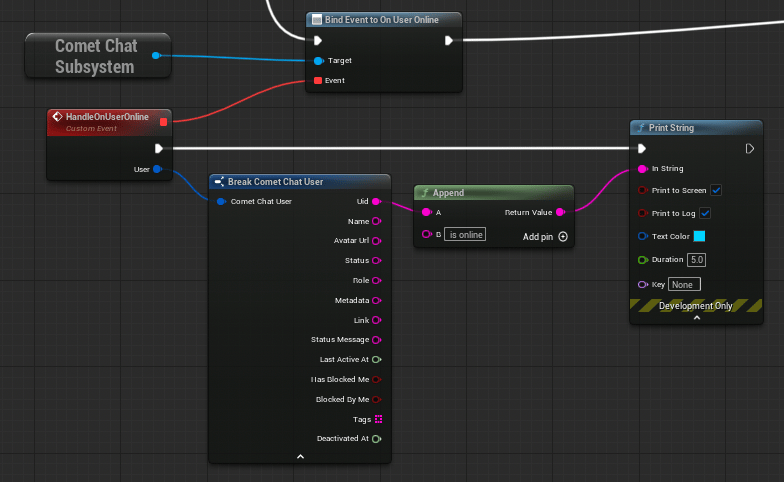
## UserListener Events
These fire when a user's online status changes.
 | Delegate | Payload | Fires When |
| --------------- | ---------------- | ------------------- |
| `OnUserOnline` | `FCometChatUser` | A user comes online |
| `OnUserOffline` | `FCometChatUser` | A user goes offline |
Bind to **On User Online** / **On User Offline**. The custom event receives an `FCometChatUser` with the user's full profile.
```cpp theme={null}
void AMyActor::HandleUserOnline(const FCometChatUser& User)
{
UE_LOG(LogTemp, Log, TEXT("%s is now online"), *User.Name);
}
void AMyActor::HandleUserOffline(const FCometChatUser& User)
{
UE_LOG(LogTemp, Log, TEXT("%s went offline"), *User.Name);
}
```
***
## GroupListener Events
These fire when group membership changes occur.
| Delegate | Payload | Fires When |
| --------------------------- | ------------------------------------------------------------------------- | ---------------------------------------- |
| `OnGroupMemberJoined` | `FCometChatAction`, `FCometChatUser`, `FCometChatGroup` | A user joins a group |
| `OnGroupMemberLeft` | `FCometChatAction`, `FCometChatUser`, `FCometChatGroup` | A user leaves a group |
| `OnGroupMemberKicked` | `FCometChatAction`, `FCometChatUser`, `FCometChatUser`, `FCometChatGroup` | A member is kicked (includes who kicked) |
| `OnGroupMemberBanned` | `FCometChatAction`, `FCometChatUser`, `FCometChatUser`, `FCometChatGroup` | A member is banned (includes who banned) |
| `OnGroupMemberUnbanned` | `FCometChatAction`, `FCometChatUser`, `FCometChatUser`, `FCometChatGroup` | A member is unbanned |
| `OnGroupMemberScopeChanged` | `FCometChatScopeChangeEvent` | A member's role/scope changes |
| `OnMemberAddedToGroup` | `FCometChatAction`, `FCometChatUser`, `FCometChatUser`, `FCometChatGroup` | A member is added by another user |
Bind to **On Group Member Joined**. The custom event receives the action, the user who joined, and the group.
```cpp theme={null}
void AMyActor::HandleMemberJoined(const FCometChatAction& Action,
const FCometChatUser& JoinedUser, const FCometChatGroup& Group)
{
UE_LOG(LogTemp, Log, TEXT("%s joined group %s"), *JoinedUser.Name, *Group.Name);
}
```
***
## ConnectionListener Events
These fire when the WebSocket connection state changes.
| Delegate | Payload | Fires When |
| -------------------- | ----------------- | -------------------------------- |
| `OnConnected` | — | WebSocket connection established |
| `OnConnecting` | — | SDK is attempting to connect |
| `OnDisconnected` | — | WebSocket connection lost |
| `OnFeatureThrottled` | — | A feature is being rate-limited |
| `OnConnectionError` | `FCometChatError` | A connection error occurred |
Bind to **On Connected**, **On Disconnected**, etc. These are parameterless events (except `OnConnectionError` which provides an `FCometChatError`).
```cpp theme={null}
void AMyActor::HandleConnected()
{
UE_LOG(LogTemp, Log, TEXT("Connected to CometChat"));
}
void AMyActor::HandleDisconnected()
{
UE_LOG(LogTemp, Warning, TEXT("Disconnected from CometChat"));
}
void AMyActor::HandleConnectionError(const FCometChatError& Error)
{
UE_LOG(LogTemp, Error, TEXT("Connection error: %s — %s"), *Error.Code, *Error.Message);
}
```
***
## LoginListener Events
These fire on login/logout lifecycle events.
| Delegate | Payload | Fires When |
| ----------------- | ----------------- | --------------- |
| `OnLoginSuccess` | `FCometChatUser` | Login succeeds |
| `OnLoginFailure` | `FCometChatError` | Login fails |
| `OnLogoutSuccess` | — | Logout succeeds |
| `OnLogoutFailure` | `FCometChatError` | Logout fails |
Bind to **On Login Success** to receive the logged-in `FCometChatUser` after authentication completes.
```cpp theme={null}
void AMyActor::HandleLoginSuccess(const FCometChatUser& User)
{
UE_LOG(LogTemp, Log, TEXT("Logged in as %s (%s)"), *User.Name, *User.Uid);
}
void AMyActor::HandleLoginFailure(const FCometChatError& Error)
{
UE_LOG(LogTemp, Error, TEXT("Login failed: %s"), *Error.Message);
}
```
***
## AIAssistantListener Events
These fire when AI assistant interactions occur.
| Delegate | Payload | Fires When |
| -------------------- | ---------------------------- | ---------------------------- |
| `OnAIAssistantEvent` | `FCometChatAIAssistantEvent` | An AI assistant event occurs |
Bind to **On AI Assistant Event**. The custom event receives an `FCometChatAIAssistantEvent` with event type, data, conversation ID, and sender UID.
```cpp theme={null}
void AMyActor::HandleAIAssistantEvent(const FCometChatAIAssistantEvent& Event)
{
UE_LOG(LogTemp, Log, TEXT("AI event [%s] in conversation %s: %s"),
*Event.EventType, *Event.ConversationId, *Event.Data);
}
```
***
## Error Handling — FCometChatError
Many delegates and failure callbacks provide an `FCometChatError` struct with details about what went wrong. Always handle errors gracefully in your game.
### FCometChatError
| Property | Type | Description |
| --------- | --------- | ------------------------------------------------------------------------ |
| `Code` | `FString` | Machine-readable error code (e.g., `"ERR_AUTH_FAILED"`, `"ERR_NETWORK"`) |
| `Message` | `FString` | Human-readable error description |
| `Details` | `FString` | Additional context (may be empty) |
### Handling Errors
All async nodes have an **On Failure** pin. Wire it to a custom event that receives an `FString` error message. Connection and login listener events provide the full `FCometChatError` struct.
```cpp theme={null}
// Async node failure handler (simple string)
void AMyActor::HandleError(const FString& Error)
{
UE_LOG(LogTemp, Error, TEXT("Operation failed: %s"), *Error);
// Show error in UI, retry, or fallback
}
// Connection/Login listener error handler (full struct)
void AMyActor::HandleConnectionError(const FCometChatError& Error)
{
UE_LOG(LogTemp, Error, TEXT("Error [%s]: %s — %s"),
*Error.Code, *Error.Message, *Error.Details);
// Common patterns:
// - "ERR_NETWORK": Show "No internet" banner, retry with backoff
// - "ERR_AUTH_FAILED": Redirect to login screen
// - "ERR_RATE_LIMIT": Wait and retry after delay
}
```
**Best practice**: Always bind `OnConnectionError` and `OnLoginFailure` delegates early. Network issues are common in games — show a reconnection banner rather than silently failing.
***
## Manual Connection
By default, the SDK auto-connects the WebSocket after login. For games with loading screens or lobbies where real-time events aren't needed immediately, you can manage the connection manually.
### Setup Manual Mode
Set `bAutoEstablishSocketConnection = false` in `FCometChatAppSettings` when configuring:
```cpp theme={null}
FCometChatAppSettings Settings;
Settings.Region = TEXT("us");
Settings.bAutoEstablishSocketConnection = false;
Chat->ConfigureWithSettings(TEXT("YOUR_APP_ID"), Settings);
```
### Connect / Disconnect / Ping
* **Connect Async** — Establish the WebSocket after login
* **Disconnect Async** — Close the WebSocket (user stays authenticated)
* **Ping Async** — Verify the connection is alive
```cpp theme={null}
// Connect when entering chat area
auto* Connect = UCometChatConnectAction::Connect(this);
Connect->OnSuccess.AddDynamic(this, &AMyActor::OnConnected);
Connect->OnFailure.AddDynamic(this, &AMyActor::HandleError);
Connect->Activate();
// Disconnect when leaving chat area
auto* Disconnect = UCometChatDisconnectAction::Disconnect(this);
Disconnect->OnSuccess.AddDynamic(this, &AMyActor::OnDisconnected);
Disconnect->Activate();
// Health check
auto* Ping = UCometChatPingAction::Ping(this);
Ping->OnSuccess.AddDynamic(this, &AMyActor::OnPingOk);
Ping->OnFailure.AddDynamic(this, &AMyActor::OnPingFailed);
Ping->Activate();
```
### Query Connection State
```cpp theme={null}
ECometChatConnectionState State = Chat->GetConnectionStatus();
// Connected, Connecting, Disconnected, or FeatureThrottled
```
For full details on manual connection management, see [Advanced Configuration](/sdk/unreal/advanced-configuration).
***
## Next Steps
Send and receive typing state.
Drop-in chat panel and button widgets.
| Delegate | Payload | Fires When |
| --------------- | ---------------- | ------------------- |
| `OnUserOnline` | `FCometChatUser` | A user comes online |
| `OnUserOffline` | `FCometChatUser` | A user goes offline |
Bind to **On User Online** / **On User Offline**. The custom event receives an `FCometChatUser` with the user's full profile.
```cpp theme={null}
void AMyActor::HandleUserOnline(const FCometChatUser& User)
{
UE_LOG(LogTemp, Log, TEXT("%s is now online"), *User.Name);
}
void AMyActor::HandleUserOffline(const FCometChatUser& User)
{
UE_LOG(LogTemp, Log, TEXT("%s went offline"), *User.Name);
}
```
***
## GroupListener Events
These fire when group membership changes occur.
| Delegate | Payload | Fires When |
| --------------------------- | ------------------------------------------------------------------------- | ---------------------------------------- |
| `OnGroupMemberJoined` | `FCometChatAction`, `FCometChatUser`, `FCometChatGroup` | A user joins a group |
| `OnGroupMemberLeft` | `FCometChatAction`, `FCometChatUser`, `FCometChatGroup` | A user leaves a group |
| `OnGroupMemberKicked` | `FCometChatAction`, `FCometChatUser`, `FCometChatUser`, `FCometChatGroup` | A member is kicked (includes who kicked) |
| `OnGroupMemberBanned` | `FCometChatAction`, `FCometChatUser`, `FCometChatUser`, `FCometChatGroup` | A member is banned (includes who banned) |
| `OnGroupMemberUnbanned` | `FCometChatAction`, `FCometChatUser`, `FCometChatUser`, `FCometChatGroup` | A member is unbanned |
| `OnGroupMemberScopeChanged` | `FCometChatScopeChangeEvent` | A member's role/scope changes |
| `OnMemberAddedToGroup` | `FCometChatAction`, `FCometChatUser`, `FCometChatUser`, `FCometChatGroup` | A member is added by another user |
Bind to **On Group Member Joined**. The custom event receives the action, the user who joined, and the group.
```cpp theme={null}
void AMyActor::HandleMemberJoined(const FCometChatAction& Action,
const FCometChatUser& JoinedUser, const FCometChatGroup& Group)
{
UE_LOG(LogTemp, Log, TEXT("%s joined group %s"), *JoinedUser.Name, *Group.Name);
}
```
***
## ConnectionListener Events
These fire when the WebSocket connection state changes.
| Delegate | Payload | Fires When |
| -------------------- | ----------------- | -------------------------------- |
| `OnConnected` | — | WebSocket connection established |
| `OnConnecting` | — | SDK is attempting to connect |
| `OnDisconnected` | — | WebSocket connection lost |
| `OnFeatureThrottled` | — | A feature is being rate-limited |
| `OnConnectionError` | `FCometChatError` | A connection error occurred |
Bind to **On Connected**, **On Disconnected**, etc. These are parameterless events (except `OnConnectionError` which provides an `FCometChatError`).
```cpp theme={null}
void AMyActor::HandleConnected()
{
UE_LOG(LogTemp, Log, TEXT("Connected to CometChat"));
}
void AMyActor::HandleDisconnected()
{
UE_LOG(LogTemp, Warning, TEXT("Disconnected from CometChat"));
}
void AMyActor::HandleConnectionError(const FCometChatError& Error)
{
UE_LOG(LogTemp, Error, TEXT("Connection error: %s — %s"), *Error.Code, *Error.Message);
}
```
***
## LoginListener Events
These fire on login/logout lifecycle events.
| Delegate | Payload | Fires When |
| ----------------- | ----------------- | --------------- |
| `OnLoginSuccess` | `FCometChatUser` | Login succeeds |
| `OnLoginFailure` | `FCometChatError` | Login fails |
| `OnLogoutSuccess` | — | Logout succeeds |
| `OnLogoutFailure` | `FCometChatError` | Logout fails |
Bind to **On Login Success** to receive the logged-in `FCometChatUser` after authentication completes.
```cpp theme={null}
void AMyActor::HandleLoginSuccess(const FCometChatUser& User)
{
UE_LOG(LogTemp, Log, TEXT("Logged in as %s (%s)"), *User.Name, *User.Uid);
}
void AMyActor::HandleLoginFailure(const FCometChatError& Error)
{
UE_LOG(LogTemp, Error, TEXT("Login failed: %s"), *Error.Message);
}
```
***
## AIAssistantListener Events
These fire when AI assistant interactions occur.
| Delegate | Payload | Fires When |
| -------------------- | ---------------------------- | ---------------------------- |
| `OnAIAssistantEvent` | `FCometChatAIAssistantEvent` | An AI assistant event occurs |
Bind to **On AI Assistant Event**. The custom event receives an `FCometChatAIAssistantEvent` with event type, data, conversation ID, and sender UID.
```cpp theme={null}
void AMyActor::HandleAIAssistantEvent(const FCometChatAIAssistantEvent& Event)
{
UE_LOG(LogTemp, Log, TEXT("AI event [%s] in conversation %s: %s"),
*Event.EventType, *Event.ConversationId, *Event.Data);
}
```
***
## Error Handling — FCometChatError
Many delegates and failure callbacks provide an `FCometChatError` struct with details about what went wrong. Always handle errors gracefully in your game.
### FCometChatError
| Property | Type | Description |
| --------- | --------- | ------------------------------------------------------------------------ |
| `Code` | `FString` | Machine-readable error code (e.g., `"ERR_AUTH_FAILED"`, `"ERR_NETWORK"`) |
| `Message` | `FString` | Human-readable error description |
| `Details` | `FString` | Additional context (may be empty) |
### Handling Errors
All async nodes have an **On Failure** pin. Wire it to a custom event that receives an `FString` error message. Connection and login listener events provide the full `FCometChatError` struct.
```cpp theme={null}
// Async node failure handler (simple string)
void AMyActor::HandleError(const FString& Error)
{
UE_LOG(LogTemp, Error, TEXT("Operation failed: %s"), *Error);
// Show error in UI, retry, or fallback
}
// Connection/Login listener error handler (full struct)
void AMyActor::HandleConnectionError(const FCometChatError& Error)
{
UE_LOG(LogTemp, Error, TEXT("Error [%s]: %s — %s"),
*Error.Code, *Error.Message, *Error.Details);
// Common patterns:
// - "ERR_NETWORK": Show "No internet" banner, retry with backoff
// - "ERR_AUTH_FAILED": Redirect to login screen
// - "ERR_RATE_LIMIT": Wait and retry after delay
}
```
**Best practice**: Always bind `OnConnectionError` and `OnLoginFailure` delegates early. Network issues are common in games — show a reconnection banner rather than silently failing.
***
## Manual Connection
By default, the SDK auto-connects the WebSocket after login. For games with loading screens or lobbies where real-time events aren't needed immediately, you can manage the connection manually.
### Setup Manual Mode
Set `bAutoEstablishSocketConnection = false` in `FCometChatAppSettings` when configuring:
```cpp theme={null}
FCometChatAppSettings Settings;
Settings.Region = TEXT("us");
Settings.bAutoEstablishSocketConnection = false;
Chat->ConfigureWithSettings(TEXT("YOUR_APP_ID"), Settings);
```
### Connect / Disconnect / Ping
* **Connect Async** — Establish the WebSocket after login
* **Disconnect Async** — Close the WebSocket (user stays authenticated)
* **Ping Async** — Verify the connection is alive
```cpp theme={null}
// Connect when entering chat area
auto* Connect = UCometChatConnectAction::Connect(this);
Connect->OnSuccess.AddDynamic(this, &AMyActor::OnConnected);
Connect->OnFailure.AddDynamic(this, &AMyActor::HandleError);
Connect->Activate();
// Disconnect when leaving chat area
auto* Disconnect = UCometChatDisconnectAction::Disconnect(this);
Disconnect->OnSuccess.AddDynamic(this, &AMyActor::OnDisconnected);
Disconnect->Activate();
// Health check
auto* Ping = UCometChatPingAction::Ping(this);
Ping->OnSuccess.AddDynamic(this, &AMyActor::OnPingOk);
Ping->OnFailure.AddDynamic(this, &AMyActor::OnPingFailed);
Ping->Activate();
```
### Query Connection State
```cpp theme={null}
ECometChatConnectionState State = Chat->GetConnectionStatus();
// Connected, Connecting, Disconnected, or FeatureThrottled
```
For full details on manual connection management, see [Advanced Configuration](/sdk/unreal/advanced-configuration).
***
## Next Steps
Send and receive typing state.
Drop-in chat panel and button widgets.