> ## Documentation Index
> Fetch the complete documentation index at: https://cometchat-22654f5b-docs-angular-v5-docs-update.mintlify.site/llms.txt
> Use this file to discover all available pages before exploring further.
# Moderation
> Flag messages for review and track moderation status.
The CometChat Unreal SDK provides moderation tools to let users report inappropriate content. You can flag messages with a reason, fetch available flag reasons, and track moderation status on messages.
***
## Flag a Message
Use the **Flag Message Async** node to report a message for moderation review.
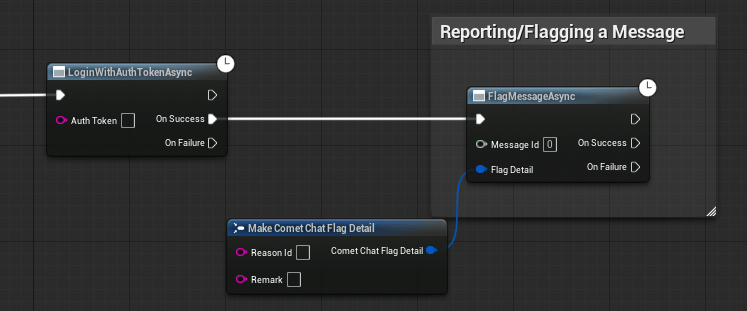 1. Create an `FCometChatFlagDetail` struct with the `ReasonId` and optional `Remark`
2. Call the **Flag Message Async** node with the message ID and flag detail
3. Handle **On Success** (message flagged) or **On Failure** (error)
```cpp theme={null}
void AMyActor::FlagMessage(const FString& MessageId)
{
FCometChatFlagDetail FlagDetail;
FlagDetail.ReasonId = TEXT("spam");
FlagDetail.Remark = TEXT("This message is spam");
auto* Action = UCometChatFlagMessageAction::FlagMessage(this, MessageId, FlagDetail);
Action->OnSuccess.AddDynamic(this, &AMyActor::HandleFlagSuccess);
Action->OnFailure.AddDynamic(this, &AMyActor::HandleError);
Action->Activate();
}
void AMyActor::HandleFlagSuccess()
{
UE_LOG(LogTemp, Log, TEXT("Message flagged successfully"));
}
```
***
## Get Flag Reasons
Fetch the list of available reasons a user can select when flagging a message.
1. Call the **Get Flag Reasons Async** node (no parameters needed)
2. On Success, iterate the returned `TArray`
3. Display the reasons in a UI picker for the user to select from
```cpp theme={null}
void AMyActor::FetchFlagReasons()
{
auto* Action = UCometChatGetFlagReasonsAction::GetFlagReasons(this);
Action->OnSuccess.AddDynamic(this, &AMyActor::HandleFlagReasons);
Action->OnFailure.AddDynamic(this, &AMyActor::HandleError);
Action->Activate();
}
void AMyActor::HandleFlagReasons(const TArray& Reasons)
{
for (const auto& Reason : Reasons)
{
UE_LOG(LogTemp, Log, TEXT("Reason: %s — %s"), *Reason.Name, *Reason.Description);
}
}
```
***
## Moderation Status on Messages
Every `FCometChatMessage` includes a `ModerationStatus` field of type `ECometChatModerationStatus`. Use this to filter or visually indicate moderated content in your UI.
```mermaid theme={null}
flowchart LR
A["Message Sent"] --> B["Unmoderated"]
B --> C{"Auto-moderation
1. Create an `FCometChatFlagDetail` struct with the `ReasonId` and optional `Remark`
2. Call the **Flag Message Async** node with the message ID and flag detail
3. Handle **On Success** (message flagged) or **On Failure** (error)
```cpp theme={null}
void AMyActor::FlagMessage(const FString& MessageId)
{
FCometChatFlagDetail FlagDetail;
FlagDetail.ReasonId = TEXT("spam");
FlagDetail.Remark = TEXT("This message is spam");
auto* Action = UCometChatFlagMessageAction::FlagMessage(this, MessageId, FlagDetail);
Action->OnSuccess.AddDynamic(this, &AMyActor::HandleFlagSuccess);
Action->OnFailure.AddDynamic(this, &AMyActor::HandleError);
Action->Activate();
}
void AMyActor::HandleFlagSuccess()
{
UE_LOG(LogTemp, Log, TEXT("Message flagged successfully"));
}
```
***
## Get Flag Reasons
Fetch the list of available reasons a user can select when flagging a message.
1. Call the **Get Flag Reasons Async** node (no parameters needed)
2. On Success, iterate the returned `TArray`
3. Display the reasons in a UI picker for the user to select from
```cpp theme={null}
void AMyActor::FetchFlagReasons()
{
auto* Action = UCometChatGetFlagReasonsAction::GetFlagReasons(this);
Action->OnSuccess.AddDynamic(this, &AMyActor::HandleFlagReasons);
Action->OnFailure.AddDynamic(this, &AMyActor::HandleError);
Action->Activate();
}
void AMyActor::HandleFlagReasons(const TArray& Reasons)
{
for (const auto& Reason : Reasons)
{
UE_LOG(LogTemp, Log, TEXT("Reason: %s — %s"), *Reason.Name, *Reason.Description);
}
}
```
***
## Moderation Status on Messages
Every `FCometChatMessage` includes a `ModerationStatus` field of type `ECometChatModerationStatus`. Use this to filter or visually indicate moderated content in your UI.
```mermaid theme={null}
flowchart LR
A["Message Sent"] --> B["Unmoderated"]
B --> C{"Auto-moderation
or manual review"}
C -->|"Approved"| D["Approved ✓"]
C -->|"Flagged"| E["Pending Review"]
E -->|"Reviewer approves"| D
E -->|"Reviewer rejects"| F["Disapproved ✗"]
style A fill:#333,stroke:#666,color:#fff
style B fill:#444,stroke:#888,color:#fff
style C fill:#555,stroke:#999,color:#ccc
style D fill:#333,stroke:#666,color:#fff
style E fill:#444,stroke:#888,color:#fff
style F fill:#333,stroke:#666,color:#fff
```
### ECometChatModerationStatus
| Value | Description |
| ------------- | --------------------------------------- |
| `Unmoderated` | Message has not been moderated |
| `Pending` | Message is pending moderation review |
| `Approved` | Message has been approved by moderation |
| `Disapproved` | Message has been rejected by moderation |
### Real-Time Moderation Updates
Listen to the `OnMessageModerated` delegate to receive real-time updates when a message's moderation status changes:
Bind to **On Message Moderated** on the CometChat Subsystem. The event provides the updated `FCometChatMessage` with the new `ModerationStatus`.
```cpp theme={null}
void AMyActor::BeginPlay()
{
Super::BeginPlay();
UCometChatSubsystem* Chat = GetGameInstance()->GetSubsystem();
Chat->OnMessageModerated.AddDynamic(this, &AMyActor::HandleMessageModerated);
}
void AMyActor::HandleMessageModerated(const FCometChatMessage& Message)
{
switch (Message.ModerationStatus)
{
case ECometChatModerationStatus::Approved:
UE_LOG(LogTemp, Log, TEXT("Message %s approved"), *Message.Id);
break;
case ECometChatModerationStatus::Disapproved:
UE_LOG(LogTemp, Log, TEXT("Message %s disapproved — hiding"), *Message.Id);
HideMessage(Message.Id);
break;
default:
break;
}
}
```
***
## FCometChatFlagDetail
The struct you provide when flagging a message.
| Property | Type | Description |
| ---------- | --------- | --------------------------------------------- |
| `ReasonId` | `FString` | ID of the flag reason (from `GetFlagReasons`) |
| `Remark` | `FString` | Optional free-text remark from the reporter |
## FCometChatFlagReason
The struct returned when fetching available flag reasons.
| Property | Type | Description |
| ------------- | --------- | ----------------------------------------- |
| `Id` | `FString` | Unique reason identifier |
| `Name` | `FString` | Display name (e.g., "Spam", "Harassment") |
| `Description` | `FString` | Detailed description of the reason |
| `CreatedAt` | `int64` | Creation timestamp |
| `UpdatedAt` | `int64` | Last update timestamp |
***
## Next Steps
Listen for moderation status changes in real time.
Complete reference of all structs and enums.