> ## Documentation Index
> Fetch the complete documentation index at: https://cometchat-22654f5b-docs-angular-v5-docs-update.mintlify.site/llms.txt
> Use this file to discover all available pages before exploring further.
# Advanced Configuration
> Fine-tune SDK settings, manage connections manually, and query authentication state.
Beyond the basic `Configure` call, the CometChat Unreal SDK offers advanced configuration for custom hosts, manual connection management, and runtime state queries.
***
## ConfigureWithSettings
Use `ConfigureWithSettings` instead of `Configure` when you need control over connection behavior, custom hosts, or presence subscription settings.
1. Create an `FCometChatAppSettings` struct
2. Set the desired properties (region, custom hosts, auto-connect behavior)
3. Call **Configure With Settings** on the CometChat Subsystem with your App ID and the settings struct
```cpp theme={null}
void AMyActor::InitCometChat()
{
UCometChatSubsystem* Chat = GetGameInstance()->GetSubsystem();
FCometChatAppSettings Settings;
Settings.Region = TEXT("us");
Settings.bAutoEstablishSocketConnection = false; // Manual connection mode
Settings.SubscriptionType = TEXT("allUsers");
Chat->ConfigureWithSettings(TEXT("YOUR_APP_ID"), Settings);
}
```
### FCometChatAppSettings
| Property | Type | Default | Description |
| -------------------------------- | ----------------- | ------- | ----------------------------------------------------------- |
| `Region` | `FString` | — | App region (`us` or `eu`) |
| `SubscriptionType` | `FString` | — | Presence subscription type (`allUsers`, `roles`, `friends`) |
| `Roles` | `TArray` | — | Roles to subscribe to (when `SubscriptionType` is `roles`) |
| `AdminHost` | `FString` | — | Custom admin API host URL |
| `ClientHost` | `FString` | — | Custom client/WebSocket host URL |
| `bAutoEstablishSocketConnection` | `bool` | `true` | Automatically connect WebSocket on login |
When `bAutoEstablishSocketConnection` is `true` (default), the SDK connects the WebSocket immediately after a successful login. Set to `false` if you want to control when the connection is established — useful for splash screens or loading flows.
***
## Manual Connection Management
When `bAutoEstablishSocketConnection` is `false`, use the async connection nodes to control the WebSocket lifecycle.
### Connect
Manually establish the WebSocket connection after login.
Call the **Connect Async** node after login succeeds. Handle **On Success** to know the connection is ready.
```cpp theme={null}
void AMyActor::ManualConnect()
{
auto* Action = UCometChatConnectAction::Connect(this);
Action->OnSuccess.AddDynamic(this, &AMyActor::HandleConnected);
Action->OnFailure.AddDynamic(this, &AMyActor::HandleError);
Action->Activate();
}
void AMyActor::HandleConnected()
{
UE_LOG(LogTemp, Log, TEXT("WebSocket connected — ready to receive events"));
}
```
### Disconnect
Manually close the WebSocket connection without logging out.
Call the **Disconnect Async** node. The user remains authenticated but won't receive real-time events.
```cpp theme={null}
void AMyActor::ManualDisconnect()
{
auto* Action = UCometChatDisconnectAction::Disconnect(this);
Action->OnSuccess.AddDynamic(this, &AMyActor::HandleDisconnected);
Action->OnFailure.AddDynamic(this, &AMyActor::HandleError);
Action->Activate();
}
```
### Ping
Verify the connection is alive by sending a ping to the server.
Call the **Ping Async** node. **On Success** means the server responded — connection is healthy.
```cpp theme={null}
void AMyActor::PingServer()
{
auto* Action = UCometChatPingAction::Ping(this);
Action->OnSuccess.AddDynamic(this, &AMyActor::HandlePingSuccess);
Action->OnFailure.AddDynamic(this, &AMyActor::HandlePingFailed);
Action->Activate();
}
```
***
## Connection Status
Query the current WebSocket connection state at any time.
Call **Get Connection Status** on the CometChat Subsystem. Returns an `ECometChatConnectionState` enum.
```cpp theme={null}
void AMyActor::CheckConnection()
{
UCometChatSubsystem* Chat = GetGameInstance()->GetSubsystem();
ECometChatConnectionState State = Chat->GetConnectionStatus();
switch (State)
{
case ECometChatConnectionState::Connected:
UE_LOG(LogTemp, Log, TEXT("Connected"));
break;
case ECometChatConnectionState::Connecting:
UE_LOG(LogTemp, Log, TEXT("Connecting..."));
break;
case ECometChatConnectionState::Disconnected:
UE_LOG(LogTemp, Warning, TEXT("Disconnected"));
break;
case ECometChatConnectionState::FeatureThrottled:
UE_LOG(LogTemp, Warning, TEXT("Feature throttled"));
break;
}
}
```
### ECometChatConnectionState
| Value | Description |
| ------------------ | --------------------------------------------- |
| `Connected` | WebSocket is active and receiving events |
| `Connecting` | SDK is attempting to establish the connection |
| `Disconnected` | WebSocket is closed |
| `FeatureThrottled` | A feature is being rate-limited by the server |
***
## Authentication State
### IsLoggedIn
Check whether a user is currently authenticated.
Call **Is Logged In** on the CometChat Subsystem. Returns a `bool`.
```cpp theme={null}
bool bLoggedIn = Chat->IsLoggedIn();
```
### GetLoggedInUser
Retrieve the currently authenticated user's profile.
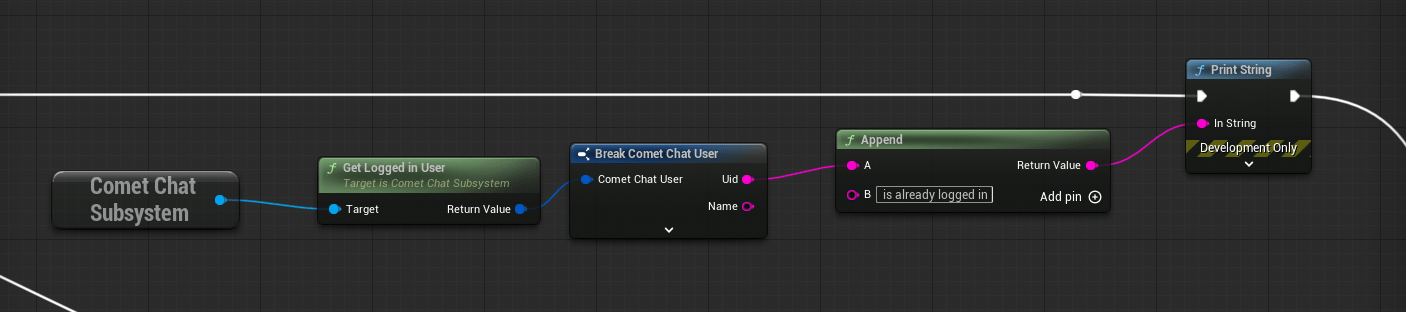 Call **Get Logged In User** on the CometChat Subsystem. Returns an `FCometChatUser`.
```cpp theme={null}
FCometChatUser CurrentUser = Chat->GetLoggedInUser();
UE_LOG(LogTemp, Log, TEXT("Logged in as: %s (%s)"), *CurrentUser.Name, *CurrentUser.Uid);
```
***
## Connection Flow (Manual Mode)
```mermaid theme={null}
flowchart TD
A["ConfigureWithSettings
Call **Get Logged In User** on the CometChat Subsystem. Returns an `FCometChatUser`.
```cpp theme={null}
FCometChatUser CurrentUser = Chat->GetLoggedInUser();
UE_LOG(LogTemp, Log, TEXT("Logged in as: %s (%s)"), *CurrentUser.Name, *CurrentUser.Uid);
```
***
## Connection Flow (Manual Mode)
```mermaid theme={null}
flowchart TD
A["ConfigureWithSettings
(bAutoEstablishSocketConnection = false)"] --> B["Login Async"]
B -->|"On Success"| C["User authenticated
(no WebSocket yet)"]
C --> D["Connect Async"]
D -->|"On Success"| E["WebSocket active
Real-time events flowing"]
E --> F["Disconnect Async"]
F -->|"On Success"| G["WebSocket closed
(still authenticated)"]
G --> D
style A fill:#333,stroke:#666,color:#fff
style B fill:#444,stroke:#888,color:#fff
style C fill:#333,stroke:#666,color:#fff
style D fill:#444,stroke:#888,color:#fff
style E fill:#333,stroke:#666,color:#fff
style F fill:#444,stroke:#888,color:#fff
style G fill:#333,stroke:#666,color:#fff
```
**When to use manual mode**: If your game has a loading screen or lobby where you don't need real-time events yet, configure with `bAutoEstablishSocketConnection = false`, then call `Connect` when the player enters the chat-enabled area. This saves bandwidth and server resources.
***
## Next Steps
Log users in with Auth Key or Auth Token.
Listen for connection state changes and other events.